





Jabra
Jabra PanaCast 40 VBS Video Conference Equipment - Small Room Size Supported - For Video Conferencing, Meeting Room - 3840 x 2160 Video (Live) - 4K - Network (RJ-45) - 1 x HDMI In - USB - Ethernet - Wireless LAN - Wall Mountable, Tabletop, Tripod Mount
Estimated shipping in 5 business days
EAN: 5706991033793
Jabra PanaCast 40 VBS · 8721-231 · Microsoft Teams Rooms · Video Bar + Touch Controller
The ready-to-use Teams room, with video bar and touch controller in the same bundle.
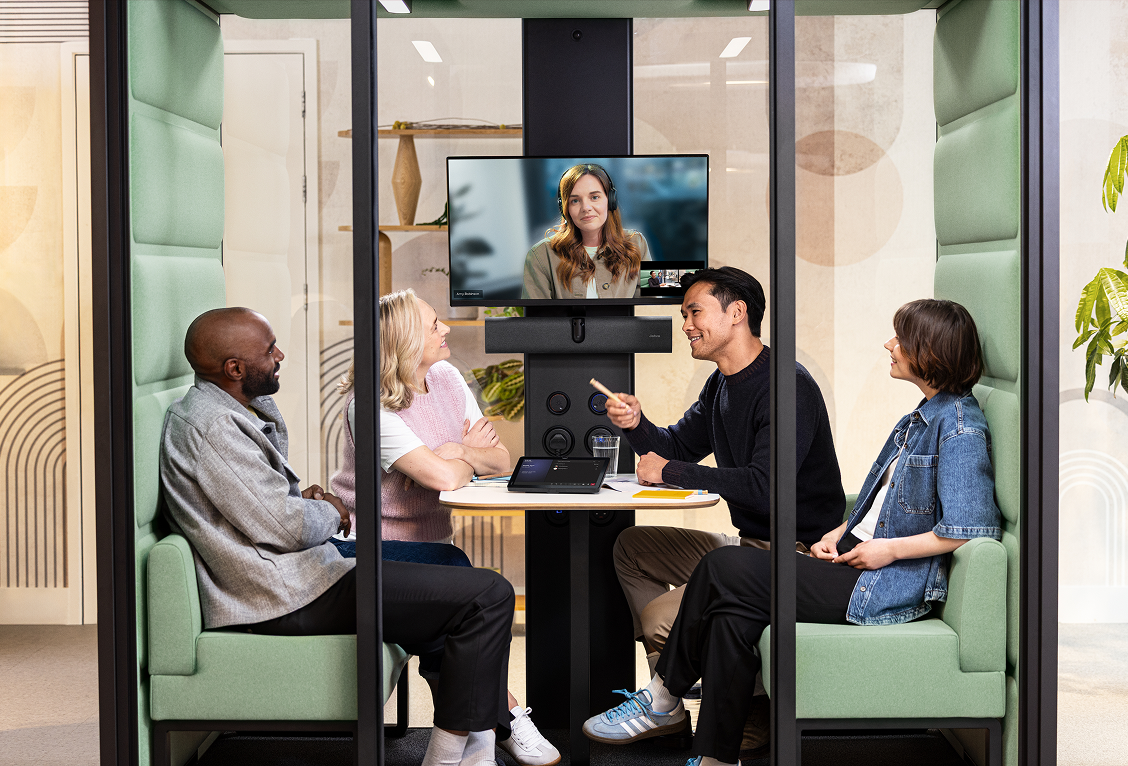
The Jabra PanaCast 40 VBS 8721-231 is the complete solution for small Microsoft Teams Rooms meeting rooms, combining an Android video bar, a 4K panoramic camera, integrated audio, AI for intelligent framing, and Jabra Control IP for tactile meeting control.
Complete bundle
More than just the bar. This pack includes the touch controller.
Unlike the Bar Only version, reference 8721-231 includes the Jabra Control IP, allowing you to control the room directly from the table, start meetings with a tap, and create a cleaner, more professional Microsoft Teams Rooms experience.
PanaCast 40 VBS
Android video bar with panoramic camera, integrated audio, AI, and remote management.
Jabra Control IP
Touch controller for managing calls, meetings, and the room experience.
USB-C to USB-C cable
3m cable included for connecting compatible components.
Power supply
Power adapter included for system installation.
Wall mount
Allows for a clean installation of the video bar next to the room screen.
Privacy cover
Physical privacy cover to protect the camera when not in use.
HDMI cable
1.83m HDMI cable included for connecting to the display system.
Regional power cable
Power cable suitable for the EMEA region.
Advantage over Bar Only version
The difference is in the room experience, not just the equipment.
The Bar Only version might make sense when a compatible touch screen or a defined control setup already exists. The 8721-231 is the most direct choice when you want to deliver a more complete Teams room, with a dedicated control console included.
| Criterion | 8721-231 · Video Bar + Touch Controller | 8701-231 · Bar Only |
|---|---|---|
| Touch controller included | Yes, includes Jabra Control IP. | Does not include a dedicated touch controller. |
| Microsoft Teams Rooms experience | More complete, with in-table room control. | Depends on compatible touch screen or additional setup. |
| Commercial installation | Simpler to sell as a ready-to-use room solution. | More suitable for projects where the client already has peripherals or wants a more specific configuration. |
| Daily use | Allows starting, managing, and ending meetings without relying solely on the main screen. | Less convenient if there is no other control point in the room. |
| Perceived customer value | Higher, because it delivers a more complete and professional meeting station. | More economical, but less complete as a final solution. |
Room transformation
The room adapts to the meeting, not the other way around.
In small rooms, the problem is rarely just the camera. It's the short angle, people out of frame, weak audio, and the lack of a simple way to control the meeting. The PanaCast 40 VBS 8721-231 solves this with a video bar, artificial intelligence, and a touch controller in the same bundle.
180° without blind spots
Ultra-wide field of view to include participants next to the screen, in corners or against the wall.
4K panoramic image
Resolution up to 3840 x 1080 px, with digital zoom up to 4x to better capture the room.
Clear audio
Array of 6 beamforming microphones with echo cancellation and non-vocal noise suppression.
Touch control included
The Jabra Control IP allows meeting control from the table, without relying solely on the main screen.
Artificial intelligence
The room adapts to the meeting, not the other way around.
The video experience is supported by smart features that adjust framing, highlight speakers, and help remote participants better follow the conversation.
Dynamic Composition
Presents a room view and close-ups of active participants, making the conversation easier to follow.
Virtual Director
Identifies who is speaking and adjusts the image in real time to give remote participants more context.
Intelligent Zoom
Keeps participants framed even when they move around the room.
Intelligent Meeting Space
Sets virtual boundaries to focus only on people within the meeting zone, useful in glass-enclosed or open spaces.
Installation and use
A cleaner, simpler, and more marketable Microsoft Teams Rooms setup.
Reference 8721-231 reduces the need to compose the system piece by piece. The video bar handles video, audio, and processing; the touch controller provides the user with a dedicated control point to join meetings, manage calls, and use the room with less friction.
Use cases
Ideal for companies that want a small, complete, and professional Teams room.
Huddle rooms
Perfect for compact rooms where everyone needs to appear without repositioning the camera.
Small meeting rooms
Suitable for small spaces, with audio, video, and room control in a more complete package.
Microsoft Teams Rooms
Reference 8721-231 is designed for Microsoft Teams Rooms environments, with an included touch controller.
Rooms with recurring use
More comfortable for teams that frequently join meetings and need quick control at the table.
Centralised management
Remote administration through compatible tools, useful for IT teams and multiple offices.
Clean installations
Includes wall mount, essential cables, and controller, reducing improvisation in the final installation.
Technical specifications
Specifications
| Feature | Specification |
|---|---|
| Product | Jabra PanaCast 40 VBS, Microsoft Teams Rooms, Video Bar & Touch Controller |
| Reference | 8721-231 |
| Commercial designation | Jabra PanaCast 40 VBS, MS VB & TC, EMEA, Charger-C |
| Version | Microsoft Teams Rooms, video bar with Jabra Control IP Touch Controller |
| Product type | Video conferencing system for small meeting rooms and huddle rooms |
| Package contents | PanaCast 40 VBS, Jabra Control IP, 3m USB-C to USB-C cable, power supply, wall mount, privacy cover, 1.83m HDMI cable and regional power cable |
| Advantage over Bar Only version | Includes dedicated touch controller, offering a more complete room experience for Microsoft Teams Rooms |
| Operating system | Android 13 |
| Main unit dimensions | 530 x 105 x 60 mm |
| Main unit weight | 1.8 kg |
| Package dimensions | 866 x 110 x 210 mm |
| Package weight | 4.19 kg |
| Warranty | 2 years |
| Integrated AI | Yes |
| Cable management | Yes |
| Operating voltage | 100-240 V |
| LED indicators | Firmware update status, mute/unmute, power indicator and streaming |
| Certifications and compliance | Microsoft Teams Rooms, Zoom Rooms and ADA |
| Video input | 1 x HDMI |
| Supported display resolution | Up to 4K, touch screen compatible |
| Content sharing | Apple AirPlay, supported by Zoom only; HDMI input; Microsoft Teams Cast, supported by Teams only |
| Number of cameras | 2 |
| Camera type | Dual camera panoramic |
| Camera resolution | Up to 3840 x 1080 px |
| Zoom | Up to 4x digital |
| Field of view | Horizontal: 180°; Vertical: 50° |
| Intelligent Zoom | Yes |
| Intelligent Meeting Space | Yes |
| Multi-stream Dynamic Composition | Yes |
| Dynamic Composition | Yes |
| Virtual Director | Yes |
| Support for secondary external USB camera | Yes |
| Speaker frequency | 80 Hz - 20000 Hz |
| Number of speakers | 1 |
| Automatic speaker detection | Yes |
| Echo cancellation | Yes |
| Non-speech noise suppression | Yes |
| Number of microphones | 6 |
| Microphone sensitivity | -37 dBFS |
| Microphone frequency | 100 Hz - 16000 Hz |
| Aux-Out | 3.5 mm jack for hearing assistance devices |
| Media encryption | Provided by VaaS partner |
| Access management | Jabra+ for Admins, Jabra+, Jabra Web Console, local account and VaaS portals, including Microsoft Teams Admin Center and Zoom Device Management |
| Security management | Remote login via Jabra+, Jabra Web Console and VaaS Admin portal |
| Authenticated access to administrator settings | Yes |
| Password strength verification and enforcement | Yes |
| Device locked for security | Yes |
| Secure boot, OS verified boot and vendor lock | Yes |
| Log collection via Jabra Web Console | Yes |
| Microsoft and Zoom VaaS account authentication | Yes |
| Interfaces | USB-A, USB-C, Ethernet RJ45, HDMI, Wi-Fi 802.11a/b/g/n/ac and 3.5 mm jack port |
| Bluetooth | Version 5.2 |
| Supported USB versions | USB 2.0 and USB 3.0 |
| Recommended USB cable length | Up to 3 m |
| IP protocols | IPv4 and IPv6 |
| Ethernet | RJ45 |
| Auto-MDIX | Yes |
| Proxy | HTTP and HTTPS |
| DHCP | Yes |
| Static IP address | Yes |
| Simple Certificate Enrollment Protocol | Yes |
| Compatible software and applications | Jabra+, Jabra Web Console for remote management via HTTPS, native third-party applications, including Microsoft Teams Rooms for Android and Zoom Rooms, Microsoft Teams Admin Center and Zoom Device Management |
| Integrated People Count | Yes |
| Appliance mode | Yes |
| BYOD mode | Yes |
| Digital pan, tilt and zoom | Yes |
| Manual PTZ | Yes |
| One-touch meeting join | Yes |
| Camera privacy cover | Yes |
Note: This reference includes the Jabra Control IP. The availability of specific features may depend on the video conferencing platform, licensing, configuration, and usage environment.
-10% additional
Subscribe to our newsletter and get an additional 10% discount on your order and access to new promotions, products and publications